The Open Road, Optimized: Mobile App Design Ideas for the Ultimate Road Trip Companion
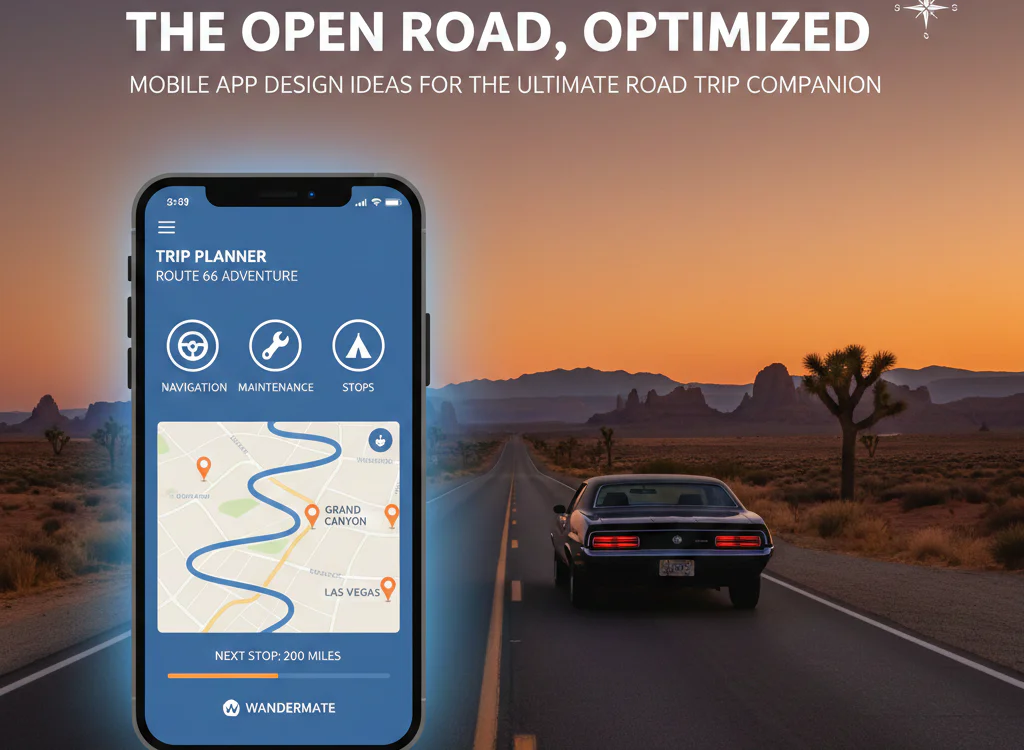
The Open Road, Optimized: Mobile App Design Ideas for the Ultimate Road Trip Companion
The call of the open road is timeless, but the way we experience it has evolved. Gone are the days of wrestling with paper maps and dog-eared guidebooks. Today’s road tripper demands a seamless, digital co-pilot. For product designers and entrepreneurs, this presents a thrilling opportunity. Designing a road trip app isn’t just about navigation; it’s about crafting an experience that enhances adventure, minimizes stress, and creates lasting memories.
This article explores cutting-edge, user-centric design ideas to build a road trip app that stands out in a crowded market and, more importantly, becomes an indispensable travel companion.
Beyond Point A to B: The Core Philosophy
The best road trip apps understand that the journey is the destination. Your design should facilitate spontaneity, discovery, and connection. Move beyond basic route planning to create a platform that curates the experience.
Feature & Design Ideas to Fuel Your Road Trip App
1. Intelligent, Adaptive Trip Planning
- Collaborative Itinerary Builder: Allow groups to co-create trips in real-time. A shared digital canvas where users can pin stops, vote on attractions, and add notes fosters collective excitement during the planning phase.
- AI-Powered “Serendipity Engine”: Integrate a feature that suggests unexpected, highly-rated detours based on user preferences (e.g., “historic landmarks,” “hidden waterfalls,” “best pie within 5 miles”). Use gentle push notifications: “Take exit 89 for a scenic overlook rated 4.8 stars, adding only 15 minutes.”
- Dynamic Duration Calculator: Instead of a static ETA, design a visual timeline that adjusts as users add stops (food, gas, hikes). Show how a 1-hour break affects the overall arrival time, empowering informed decisions.
2. Immersive In-Journey Navigation
- Context-Aware Guidance: Design a navigation mode that goes beyond “turn left in 500 ft.” Use the device’s sensors and trip data to offer insights: “You’ll be driving through Joshua Tree National Park for the next hour. Consider stopping at Skull Rock Trailhead.”
- Offline-First Map Design: Prioritize offline functionality. Allow users to download entire regions, including saved points of interest, reviews, and photos. The UI should clearly indicate what data is available offline.
- Live “Pulse” of Your Route: Implement a clean, glanceable dashboard showing live info: weather changes along your route, traffic slowdowns ahead, and upcoming fuel stations with price comparisons.
3. Local Discovery & Curation
- Layer-Based Interest Maps: Let users toggle dynamic layers over the map: “Local Food Gems,” “Photo-Worthy Spots,” “Historic Trails,” “Campgrounds with Availability.” Sourced from both curated databases and user-generated content.
- Audio-Based Discovery (Audio Beacon): For safety, design a hands-free discovery mode. As users drive, the app can gently announce nearby points of interest based on their preset interests: “Coming up on your right in 2 miles: The World’s Largest Ball of Twine.”
- Integrated Booking & Reservations: Partner with APIs for campgrounds (Recreation.gov), unique hotels, and tour guides. Enable booking within the app to create a closed-loop experience.
4. Social & Shared Experiences
- Shared Trip Journals: Create a private, multimedia timeline for each trip. Automatically log the route, while allowing users to easily add photos, voice notes, and journal entries tagged to specific locations. After the trip, generate a shareable story.
- Community-Driven Road Reports: Build a Waze-like community for road trippers. Users can report real-time conditions: “RV-friendly parking at main vista,” “Heavy wildlife crossing next 10 miles,” “Roadside taco truck here until 6 PM.”
- Challenge Badges & Gamification: Introduce light gamification. Earn digital badges for milestones (“Crossed the Mississippi,” “Visited 5 National Parks”) or completing curated challenges (“Find the best coffee in the Pacific Northwest”).
5. Essential Utility Integration
- Vehicle Health Hub: Allow users to input their vehicle details. The app can then track mileage for oil change reminders, suggest appropriate service centers along the route, and even estimate fuel costs based on MPG and current gas prices.
- Packing List Generator: Offer smart, customizable packing lists based on trip duration, destination climates, and planned activities (camping, hiking, city touring).
- Budget Tracker: A simple, built-in tool to log expenses (fuel, food, lodging) against a pre-set budget, with visual summaries.
Key UI/UX Design Principles for Road Trip Apps
- Glanceable & Distraction-Free: Prioritize large, legible typography and intuitive icons. Critical information (next turn, ETA) should be understood in under 2 seconds.
- Accessible in All Conditions: Test interfaces in bright sunlight and dark mode for night driving. Use high-contrast color schemes and clear auditory cues.
- Modular & Customizable: Recognize that no two road trips are alike. Offer customizable dashboards so a family camper and a solo adventure biker can tailor the app to their needs.
The Future is Connected: Integration Ideas
Think beyond the app itself. Consider integration with:
- Car Infotainment Systems (Android Auto, Apple CarPlay optimization is non-negotiable).
- Smartwatches for haptic turn alerts and glance info.
- Travel Vlogging Gear to auto-tag the GPS location to photos/videos.
Conclusion: Designing for the Journey
The ultimate road trip app is more than a tool; it’s a platform for possibility. By focusing on adaptive planning, immersive navigation, genuine local discovery, and social utility, you can design an app that doesn’t just plan a route—it architects an unforgettable adventure. The road is calling, and with thoughtful, user-centered design, your app can be the voice that answers.
Ready to hit the digital drawing board? Start by mapping the user journey, from the first spark of inspiration to the final photo in the scrapbook. Every screen, every feature, and every interaction should serve the spirit of discovery that defines the great American—and global—road trip.The call of the open road is timeless, but the way we experience it has evolved. Gone are the days of wrestling with paper maps and dog-eared guidebooks. Today’s road tripper demands a seamless, digital co-pilot. For product designers and entrepreneurs, this presents a thrilling opportunity. Designing a road trip app isn’t just about navigation; it’s about crafting an experience that enhances adventure, minimizes stress, and creates lasting memories.
This article explores cutting-edge, user-centric design ideas to build a road trip app that stands out in a crowded market and, more importantly, becomes an indispensable travel companion.
Beyond Point A to B: The Core Philosophy
The best road trip apps understand that the journey is the destination. Your design should facilitate spontaneity, discovery, and connection. Move beyond basic route planning to create a platform that curates the experience.
Feature & Design Ideas to Fuel Your Road Trip App
1. Intelligent, Adaptive Trip Planning
- Collaborative Itinerary Builder: Allow groups to co-create trips in real-time. A shared digital canvas where users can pin stops, vote on attractions, and add notes fosters collective excitement during the planning phase.
- AI-Powered “Serendipity Engine”: Integrate a feature that suggests unexpected, highly-rated detours based on user preferences (e.g., “historic landmarks,” “hidden waterfalls,” “best pie within 5 miles”). Use gentle push notifications: “Take exit 89 for a scenic overlook rated 4.8 stars, adding only 15 minutes.”
- Dynamic Duration Calculator: Instead of a static ETA, design a visual timeline that adjusts as users add stops (food, gas, hikes). Show how a 1-hour break affects the overall arrival time, empowering informed decisions.
2. Immersive In-Journey Navigation
- Context-Aware Guidance: Design a navigation mode that goes beyond “turn left in 500 ft.” Use the device’s sensors and trip data to offer insights: “You’ll be driving through Joshua Tree National Park for the next hour. Consider stopping at Skull Rock Trailhead.”
- Offline-First Map Design: Prioritize offline functionality. Allow users to download entire regions, including saved points of interest, reviews, and photos. The UI should clearly indicate what data is available offline.
- Live “Pulse” of Your Route: Implement a clean, glanceable dashboard showing live info: weather changes along your route, traffic slowdowns ahead, and upcoming fuel stations with price comparisons.
3. Local Discovery & Curation
- Layer-Based Interest Maps: Let users toggle dynamic layers over the map: “Local Food Gems,” “Photo-Worthy Spots,” “Historic Trails,” “Campgrounds with Availability.” Sourced from both curated databases and user-generated content.
- Audio-Based Discovery (Audio Beacon): For safety, design a hands-free discovery mode. As users drive, the app can gently announce nearby points of interest based on their preset interests: “Coming up on your right in 2 miles: The World’s Largest Ball of Twine.”
- Integrated Booking & Reservations: Partner with APIs for campgrounds (Recreation.gov), unique hotels, and tour guides. Enable booking within the app to create a closed-loop experience.
4. Social & Shared Experiences
- Shared Trip Journals: Create a private, multimedia timeline for each trip. Automatically log the route, while allowing users to easily add photos, voice notes, and journal entries tagged to specific locations. After the trip, generate a shareable story.
- Community-Driven Road Reports: Build a Waze-like community for road trippers. Users can report real-time conditions: “RV-friendly parking at main vista,” “Heavy wildlife crossing next 10 miles,” “Roadside taco truck here until 6 PM.”
- Challenge Badges & Gamification: Introduce light gamification. Earn digital badges for milestones (“Crossed the Mississippi,” “Visited 5 National Parks”) or completing curated challenges (“Find the best coffee in the Pacific Northwest”).
5. Essential Utility Integration
- Vehicle Health Hub: Allow users to input their vehicle details. The app can then track mileage for oil change reminders, suggest appropriate service centers along the route, and even estimate fuel costs based on MPG and current gas prices.
- Packing List Generator: Offer smart, customizable packing lists based on trip duration, destination climates, and planned activities (camping, hiking, city touring).
- Budget Tracker: A simple, built-in tool to log expenses (fuel, food, lodging) against a pre-set budget, with visual summaries.
Key UI/UX Design Principles for Road Trip Apps
- Glanceable & Distraction-Free: Prioritize large, legible typography and intuitive icons. Critical information (next turn, ETA) should be understood in under 2 seconds.
- Accessible in All Conditions: Test interfaces in bright sunlight and dark mode for night driving. Use high-contrast color schemes and clear auditory cues.
- Modular & Customizable: Recognize that no two road trips are alike. Offer customizable dashboards so a family camper and a solo adventure biker can tailor the app to their needs.
The Future is Connected: Integration Ideas
Think beyond the app itself. Consider integration with:
- Car Infotainment Systems (Android Auto, Apple CarPlay optimization is non-negotiable).
- Smartwatches for haptic turn alerts and glance info.
- Travel Vlogging Gear to auto-tag the GPS location to photos/videos.
Conclusion: Designing for the Journey
The ultimate road trip app is more than a tool; it’s a platform for possibility. By focusing on adaptive planning, immersive navigation, genuine local discovery, and social utility, you can design an app that doesn’t just plan a route—it architects an unforgettable adventure. The road is calling, and with thoughtful, user-centered design, your app can be the voice that answers.
Ready to hit the digital drawing board? Start by mapping the user journey, from the first spark of inspiration to the final photo in the scrapbook. Every screen, every feature, and every interaction should serve the spirit of discovery that defines the great American—and global—road trip.
You may also like to read : https://bulleyesblog.co.uk/biography/olivia-dean/